SMS Consent & Opt-In Proof
This page documents how Breezeturn collects affirmative, express consent before sending any SMS messages. It is intended to help carriers, reviewers (including Twilio and The Campaign Registry), and end users verify our opt-in process.
Program summary
- Program name
- Breezeturn SMS Notifications
- Brand
- Breezeturn
- Recipients
- Cleaning professionals invited by Breezeturn hosts, and hosts who explicitly enable SMS in their settings.
- Message content
- Cleaning job assignments, schedule changes, reminders, cleaner invitation links, and job status updates (accepted, declined, completed).
- Frequency
- Message frequency varies based on job activity.
- Message & data
- Message and data rates may apply.
- Support
- Reply HELP to any message, or email hello@breezeturn.com.
- Opt out
- Reply STOP to any message, toggle SMS off in settings, or visit the unsubscribe page.
Note to carrier & Twilio/TCR reviewers
Both opt-in surfaces are inside the Breezeturn application. The cleaner invite screen requires a unique, per-user invite token; the settings screen requires authentication. Because neither surface is publicly routable, the screenshots below document the actual CTA exactly as end users see it. If you need a live demo invite link to test the cleaner opt-in flow, please email hello@breezeturn.com and we will issue a demo token.
Opt-in method 1 — cleaner invitation acceptance
When a host invites a cleaner, the cleaner receives an SMS or email with a unique invite link of the form https://breezeturn.com/cleaner/invite/{token}. On the acceptance screen the cleaner sees an unchecked SMS consent checkbox. Consent is affirmative, opt-in only — the checkbox is never pre-checked, and accepting the invite without checking it results in no SMS enrollment.
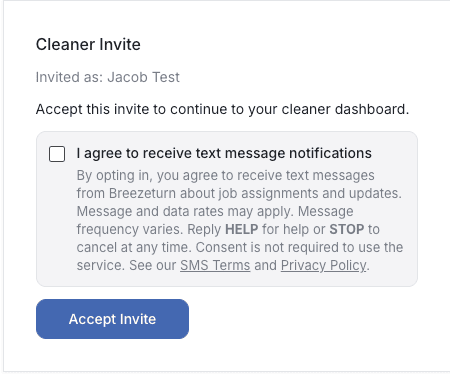
breezeturn.com/cleaner/invite/{token} · checkbox defaults to uncheckedExact disclosure text shown next to the checkbox:
“I agree to receive text message notifications. By opting in, you agree to receive text messages from Breezeturn about job assignments and updates. Message and data rates may apply. Message frequency varies. Reply HELP for help or STOP to cancel at any time. Consent is not required to use the service. See our SMS Terms and Privacy Policy.”
Opt-in method 2 — profile settings toggle
Authenticated users can enable SMS from their Breezeturn settings. The toggle defaults to off. When the user turns it on, a phone number field and a full CTIA disclosure are shown inline before any SMS can be sent.

breezeturn.com/cleaner/profile and breezeturn.com/host/settings · toggle defaults to offExact disclosure text shown beneath the toggle:
“By enabling SMS notifications, you consent to receive text messages from Breezeturn about job assignments and updates. Message and data rates may apply. Message frequency varies. Reply HELP for help or STOP to cancel. Consent is not required to use the service. See our SMS Terms and Privacy Policy.”
Opt-in confirmation message
Immediately after a user opts in, Breezeturn sends a confirmation SMS:
Breezeturn: You are now opted-in to SMS notifications for cleaning job updates. Msg frequency varies. Msg & data rates may apply. For help, reply HELP. To opt-out, reply STOP.
Consent is separate from Terms of Service
SMS consent is collected via a dedicated checkbox (cleaner invite) or dedicated toggle (settings). It is never bundled with account creation, acceptance of our Terms of Service, or our Privacy Policy. Users can create an account, accept an invite, and use every paid feature of Breezeturn without opting in to SMS.
Opt-out options
- Reply STOP, END, CANCEL, UNSUBSCRIBE, QUIT, STOPALL, OPTOUT, or REVOKE to any Breezeturn message.
- Toggle SMS off in profile settings.
- Visit the unsubscribe page.